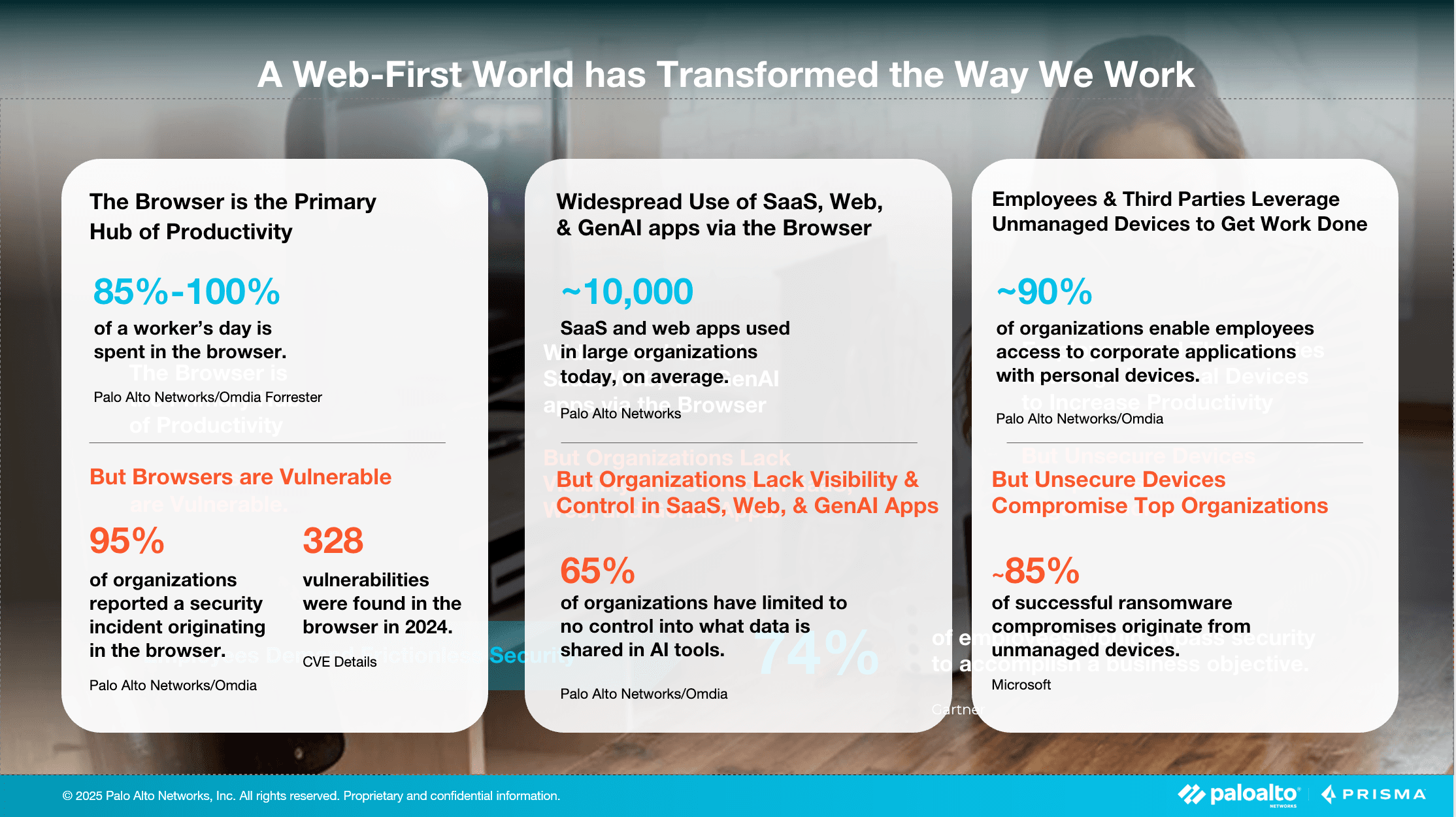
The browser has effectively become the primary workplace—and at the same time, a primary attack vector. Palo Alto Networks’ Unit 42 research indicates that approximately 44% of security incidents involved activity initiated or facilitated through the browser—such as phishing, malicious redirects, and malware downloads..
The work environment has changed radically over the past few years. Most day-to-day work now happens in the web browser. SaaS applications, online collaboration tools, ERP and CRM systems—most of them no longer require installing dedicated software.
This transformation has introduced new security challenges that traditional solutions struggle to address.
Expanding attack surface
The Unit 42 report (Palo Alto Networks’ research team) indicates that 44% of the analyzed security incidents were connected to the browser as a key threat channel. Phishing, malicious redirects, and malware downloads are just some of the attack vectors that use the browser as an entry point into an organization’s systems.
The encrypted traffic problem
Google estimates that 95% of internet traffic is now encrypted. For security teams, this creates a difficult choice: either deploy costly SSL/TLS decryption (which raises privacy concerns and does not work with all protocols such as QUIC), or accept “blind spots” in security monitoring. Both options have significant drawbacks, which is why organizations often end up balancing security against practicality.
Hybrid work and unmanaged devices
The work model has changed permanently. In Poland, around 15–30% of employees work remotely, while the hybrid model covers an additional 45% of employees in large companies.
What is particularly concerning is that in hybrid work environments, as many as 88% of Polish companies observe increased risk due to employees using unmanaged devices, often additionally supported by unauthorized GenAI tools.
This is no longer a temporary, pandemic-driven situation—it is the new reality, and it requires new approaches to security.
The generative AI challenge
A new risk is the uncontrolled use of AI tools. Cyberhaven’s 2024 report highlights an alarming trend: 27% of data entered by employees into AI tools is sensitive or regulated information. That is more than double the 10.7% recorded a year earlier—showing just how quickly the issue is escalating.
What is an enterprise browser?
An enterprise browser (secure browser) is a specialized browsing environment designed for business needs. Unlike consumer “privacy” browsers (such as Brave or DuckDuckGo), which protect the individual user, enterprise browsers protect the organization.
Key differences:
| Aspect | Consumer browser | Enterprise browser |
|---|---|---|
| Primary goal | User privacy | Protecting organizational data |
| Management | User-controlled local settings | Centralized IT policies |
| Access control | None | Granular, role-based |
| Monitoring | Minimal (privacy-driven) | Full audit (compliance) |
| Integration | None | SSO, security systems, MDM |
Gartner predicts:
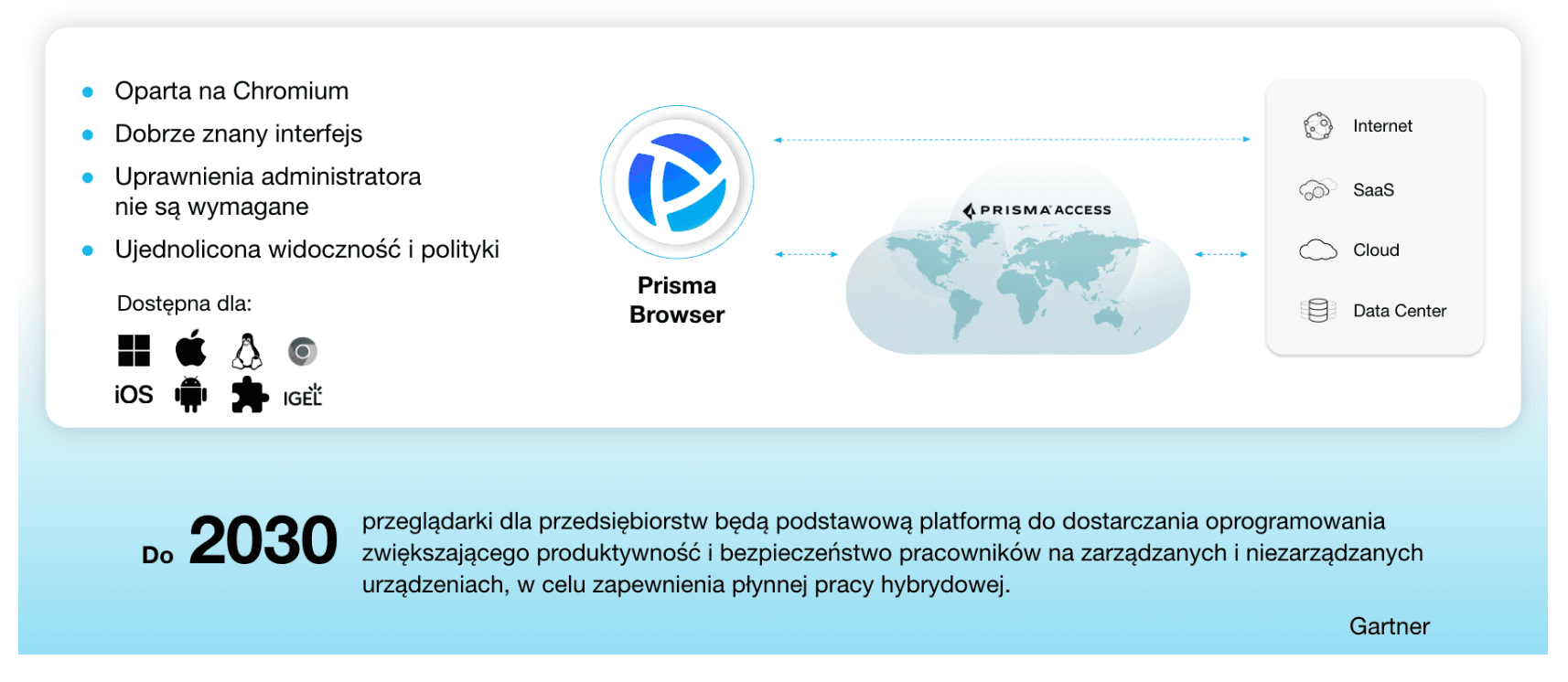
"By 2030, enterprise browsers will become the primary platform for delivering productivity and security software for employees, across both managed and unmanaged devices."
Prisma Browser – Palo Alto Networks solution overview
Palo Alto Networks has introduced a unique (and currently largely unmatched) enterprise browser solution called Prisma Browser (PB).
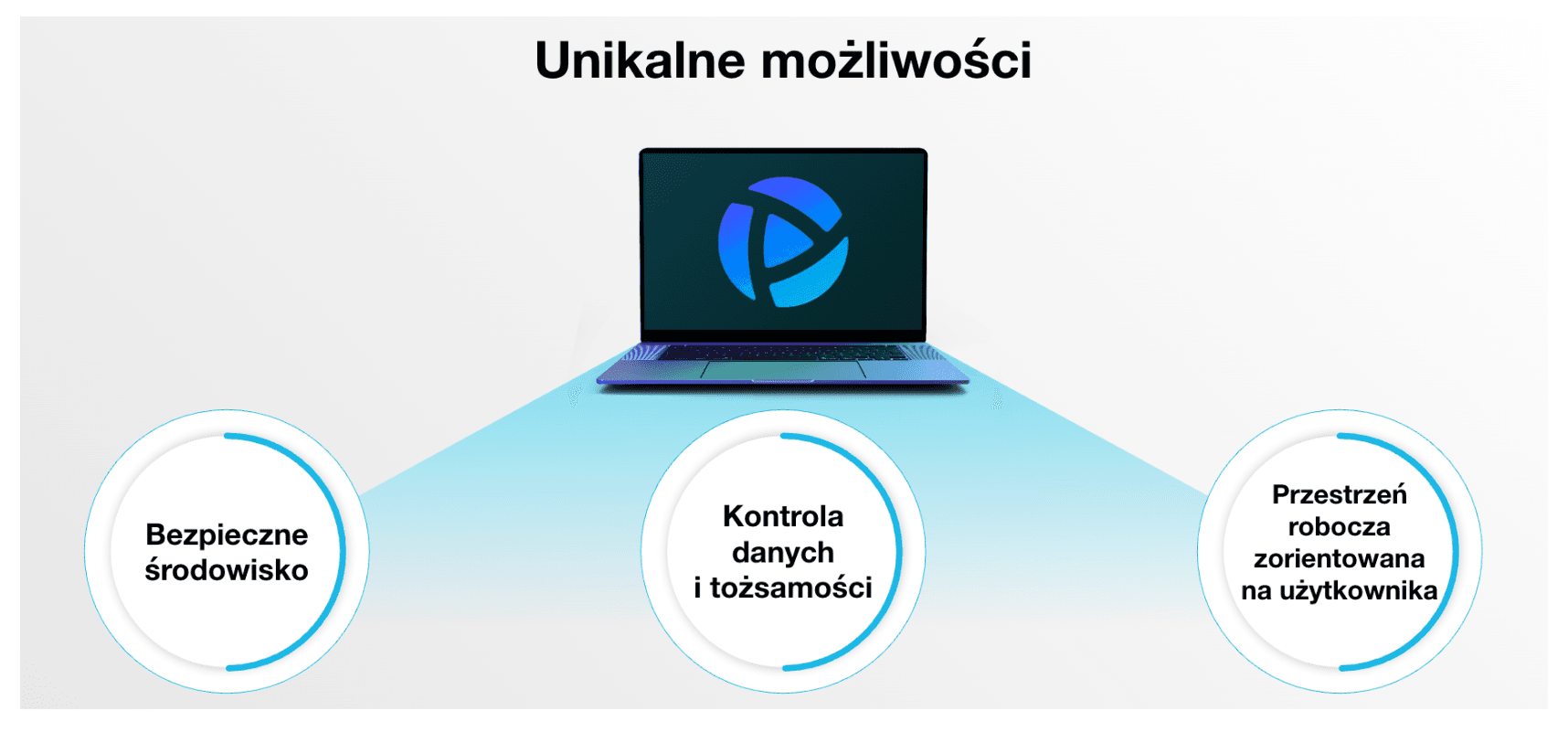
Prisma Browser is built on the Chromium engine, meaning a familiar experience for Chrome or Edge users and full compatibility with web applications. This architectural choice is critical for user adoption, as employees can continue working in a familiar environment without learning a new interface.
Unlike standard Chrome, PB includes built-in security and management mechanisms. Advanced URL Filtering classifies and blocks websites in real time using machine learning. WildFire provides a sandbox for analyzing suspicious files before execution. Enterprise DLP controls sensitive data flows at the browser level.
What does this mean in practice? Instead of relying on external network tools such as firewalls, proxies, or decryptors, protection operates directly in the browser. This approach has clear advantages—but also limitations that must be understood before deployment.
Deployment models and architecture
A key change in 2025
Palo Alto Networks recently split the product into two variants, significantly improving deployment flexibility.
The first is Prisma Browser Standalone, which operates independently of other Palo Alto products and does not require a Prisma Access (SASE) subscription. This option is suitable for organizations that want to secure the browser specifically without committing to a full SASE platform. A lower entry barrier makes it accessible to a broader range of companies.
The second variant integrates fully with Prisma Access, providing advanced ZTNA (Zero Trust Network Access) capabilities and consistent security policies for all web and network traffic. This option requires Prisma Access licensing but offers deeper integration with the broader SASE stack.
How does it work technically?
In the standalone model, the browser is installed locally on the user’s device. Security policies are pulled from the PB cloud management plane, and monitoring/logs are sent to the management console. Importantly, installation does not require administrator privileges, which greatly simplifies deployment—especially on BYOD devices.
In the Prisma Access-integrated model, traffic is additionally routed through Prisma Access gateways, enabling the full SASE stack (FWaaS, CASB, SWG, ZTNA). This allows the organization to enforce unified security policies across all access types, regardless of user location or device type.
Use cases
Prisma Browser as an enterprise browser works well in the following scenarios:
1. Access for contractors and partners
Problem: You need to provide access to internal applications for freelancers or external partners, but you do not want (or cannot) issue corporate laptops.
Traditional approaches have significant limitations. A VPN with endpoint protection on a personal device often creates compliance issues because the company lacks control over the entire device. VDI is expensive, typically costing $100–$300 per user per year. The third option—denying access—limits collaboration.
An enterprise browser provides an alternative. The contractor installs Prisma Browser on their own device and gains access only to specific applications, without visibility into the broader corporate network. DLP policies prevent data leakage, and data is not persistently stored on the contractor’s device. Critically, access can be revoked instantly when the engagement ends.
2. BYOD (Bring Your Own Device)
Problem: Employees use personal laptops, and the company has limited control over device security.
Challenges include missing security patches and outdated operating systems. Additional risks include installing potentially malicious personal software and mixing corporate with private data. Revoking access after an employee leaves can also be difficult.
An enterprise browser enables full separation between corporate and personal activity. It controls only the browser session rather than the entire device, preserving user privacy. Work occurs in an isolated, secure environment, significantly reducing the risk of threats entering the organization.
A limitation is that it only applies to web applications—if employees rely on desktop tools like AutoCAD, SAP GUI, or Adobe Premiere, a browser alone is not sufficient.
3. Privileged users
Problem: Administrators, finance analysts, HR—users with access to sensitive systems and data are often prime targets.
Privileged users require strict access policies that cannot completely block productivity. Session recording for audit purposes, MFA enforcement, and restrictions on sensitive data actions are often necessary.
Prisma Browser supports “zero trust” policies with verification on each access to critical resources. It can block printing and screenshots of sensitive content while maintaining a full audit trail. It can also prevent uploading data to personal applications, reducing both intentional and accidental leakage risks.
4. Working with AI tools
Problem: Employees use ChatGPT, Claude, Copilot—often pasting sensitive company data.
Key risks include data leakage, NDA violations, and use of data as training material. Cyberhaven data shows this risk is accelerating rapidly.
Enterprise browsers provide controls such as detecting sensitive data before submission to AI tools and automatic masking (e.g., showing “--1234” instead of full numbers). Organizations can allow only enterprise-grade AI (e.g., ChatGPT Enterprise) enforced via SSO, while blocking public AI tools entirely.
5. Mergers & acquisitions (M&A)
Problem: You need to quickly grant system access to employees from an acquired company, but you do not trust their IT environment.
The acquired company may have poor security practices, outdated systems, or even compromised devices. Traditional approaches require lengthy audits and remediation before granting access.
An enterprise browser offers a temporary solution: rapid deployment on existing devices with browser-only access, isolating organizational systems from potentially unsafe operating systems. Activity monitoring helps identify threats while the acquiring company executes a gradual IT migration without halting business operations.
Key technical capabilities
1. Visibility without decryption
Problem: Traditionally, inspecting HTTPS activity requires breaking encryption via SSL/TLS inspection. This is problematic for three reasons: it is resource-intensive, raises privacy/RODO concerns, and faces technical barriers such as certificate pinning and protocols like QUIC that are difficult or impossible to decrypt.
PB approach: Because the browser “sees” traffic before encryption at the application layer, it can analyze activity without network-level decryption. This is a fundamental architectural difference.
In practice, this enables monitoring in Office 365, Google Workspace, or Salesforce, blocking malicious downloads, and applying DLP on uploads. A limitation remains: it does not see traffic from non-browser apps such as desktop Teams or Slack.
2. Data Loss Prevention (DLP)
Prisma Browser DLP provides mechanisms such as data masking (e.g., "*** *** 1234" instead of full numbers), copy/paste blocking, and watermarks that deter photographing screens by embedding user identifiers.
It can block uploads to unauthorized applications (e.g., preventing sending corporate files via personal Gmail). Downloaded files can also be encrypted so only authorized applications can open them.
3. Application access management
The system supports highly granular policies—for example: allowing LinkedIn but blocking CV downloads; blocking personal Google Drive while allowing corporate Google Workspace. For AI tools, it can allow ChatGPT Enterprise with masking while blocking ChatGPT Free.
This granularity helps balance security and productivity—users get necessary tools, but in a controlled way that reduces leakage risk.
4. Monitoring and forensics
The system logs visited URLs, time spent in apps, attempts to access blocked resources, data transfer (uploads/downloads), and detailed SaaS activity (including user actions).
This supports security investigations, compliance audits, and threat hunting. However, employee activity monitoring has legal implications; organizations must meet information obligations under GDPR/RODO and labor law, clearly communicating scope and purpose.
Prisma Browser compared to alternative approaches
Prisma Browser vs VPN
| Aspect | VPN | Prisma Browser |
|---|---|---|
| Security model | Network-level access | Application-level access |
| Control granularity | Low | High |
| SaaS fit | Weak | Strong |
| Activity visibility | Limited | Full (browser-level) |
| Infrastructure cost | High | Lower (cloud-based) |
| Best for | Legacy apps, on-prem networks | Web apps, SaaS |
Conclusion: These approaches complement each other: VPN for legacy systems, the browser for 90% of daily web-based work.
Prisma Browser vs VDI
| Aspect | VDI | Prisma Browser |
|---|---|---|
| Isolation scope | Full desktop | Browser only |
| Cost | $100–300/user/year | $10–50/user/year |
| User experience | Latency | Native, faster |
| Desktop apps | Yes | No |
| Infrastructure | Large | Minimal |
When VDI vs browser?
VDI: CAD, IDE, compute-heavy tools, legacy software
Browser: 95% of office work (email, CRM, docs, comms)
Hybrid approach: VDI for ~10% of users (engineers/designers), browser for the rest = 70–80% VDI cost reduction.
Prisma Browser vs Remote Browser Isolation (RBI)
| Aspect | RBI | Prisma Browser |
|---|---|---|
| Where code runs | Remote server | Local device |
| Latency | Higher | Lower |
| Policy control | Limited | Full |
| Integration | Weaker | Strong (SSO, DLP, etc.) |
RBI maximizes “zero trust” by preventing web code from touching endpoints, but user experience typically suffers due to streaming/latency.
When does an enterprise browser make sense?
An enterprise browser is a strong fit when most work happens in web/SaaS apps, the organization relies on contractors/partners without corporate devices, BYOD is common, AI tool usage requires control, VDI costs need reduction, compliance demands detailed web activity logs, or “shadow IT” is a problem.
It is less optimal when core applications are desktop-based (CAD, specialized tools), industries require air-gapped environments, the organization is very small and not scaling, or all devices are fully managed with strong endpoint controls already in place.
Prisma Browser deployment with 4Prime
The pilot phase typically lasts 4–6 weeks and includes a group of 20–50 users across departments. Policies are tested in “alert only” mode—logging without blocking—to identify issues without impacting productivity.
The expansion phase takes 2–3 months, rolling out to additional departments. Policies are adjusted based on real usage, training is delivered, and user documentation is created.
The optimization phase is ongoing: analyzing logs and alerts, tuning policies to reduce false positives, and measuring ROI.
Summary
Prisma Browser, an enterprise browser from Palo Alto Networks, represents a major trend in cybersecurity. In a world where most work happens in the browser, securing this vector has become essential.
Key strengths include focusing security where work actually happens, enabling secure BYOD and contractor access, providing visibility without decryption (addressing QUIC and Microsoft 365 challenges), potential savings by reducing VDI and decryptor requirements, and controlling generative AI usage.
However, limitations remain: it applies only to web applications, requires changes in user habits and processes, introduces additional cost and management overhead, and raises employee privacy considerations that must be handled carefully.
FAQ
Is an enterprise browser just replacing Chrome with something else?
Not exactly. Most enterprise browsers (including Prisma Browser) are built on Chromium—the same engine as Chrome. The interface and app compatibility are essentially identical. The difference lies in additional security and management layers “under the hood.”
Can users still use their regular Chrome for personal use?
Yes—especially in BYOD models, this is recommended. Prisma Browser for corporate work, Chrome/Firefox for personal browsing. Separation improves both security and privacy.
How does PB compare to Google Chrome Enterprise?
Google Chrome Enterprise is also a managed Chrome with policies. Differences include:
- Chrome Enterprise: managed via Google Admin Console, baseline policies
- Prisma Browser (and other security browsers): advanced DLP, threat protection, granular SaaS control
In practice, solutions like Prisma Browser can be seen as “Chrome Enterprise on steroids,” with a dedicated security infrastructure.
Do Chrome extensions work?
Usually yes, but:
- Administrators can restrict which extensions are allowed
- Some extensions may conflict with security policies
- Best practice is to whitelist vetted extensions
Does deploying PB mean the company can see everything the user does online?
It depends on organizational policies:
- In the enterprise browser: yes—activity is monitored (that is the point). Clear acceptable-use policies are essential.
- In an employee’s private browser: no—the company has no access.
Do we need Prisma Access to use Prisma Browser?
No. Since 2025, Prisma Browser is available as a standalone product that can be used without Prisma Access. If you do have Prisma Access, integration provides additional benefits.
How long does deployment take?
Technical deployment: possible in 1–2 weeks (installation, baseline policies)
Full rollout with adoption: 2–6 months depending on org size and policy complexity
Pilot: 20–50 users can start within 1–2 weeks
What if a user uninstalls PB?
Depends on the model:
- BYOD/unmanaged devices: the user can uninstall, but then loses access to corporate apps (conditional access)
- Managed devices: admins can enforce installation via MDM/GPO
In most cases, access to critical corporate apps is restricted to the managed enterprise browser.
This article was prepared by a 4Prime expert and subsequently edited with the support of artificial intelligence tools.
Text autor: